Manggala: A Modern Playful Handwritten Font for Creative Projects
If you have ever searched for a typeface that feels both fresh and personal without sacrificing professional polish, you may have stumbled across Manggala. Created by Kong Font Studio, this modern handwritten font strikes a balance between spontaneity and structure. It is designed for crafters, graphic designers, and anyone who wants to inject a handcrafted feel into their work. In this article, we explore what makes Manggala unique, where it shines, and how you can decide whether it fits your next project.
What Makes Manggala Stand Out?
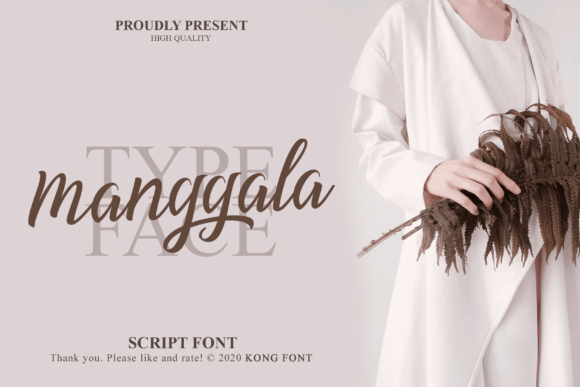
Manggala belongs to the playful handwritten category, but its charm goes beyond just being “cute.” The letterforms carry a natural bounce—some characters tilt slightly, stroke widths vary, and connections feel organic. This is not a rigid, monolinear font; it mimics real handwriting with enough consistency to remain readable. Key characteristics include:
- Playful yet legible – Even with its casual personality, Manggala maintains clear letter shapes, making it suitable for short text blocks as well as display purposes.
- Modern aesthetic – The font avoids overly ornate flourishes; instead, it uses simple, contemporary curves that feel current rather than retro.
- Versatile weight – Depending on the version available, Manggala often includes regular or bold styles, giving you flexibility for headings versus body text.
- Cross-platform compatibility – It works seamlessly with Adobe Photoshop, Illustrator, and Silhouette Design Studio, meaning crafters using cutting machines can install and use it without hassle.
These features make Manggala a strong candidate for projects that need warmth and personality without veering into illegibility.
Who Can Benefit from Manggala?
The audience for Manggala is surprisingly broad. While handwritten fonts are often pigeonholed as “only for scrapbooking,” this typeface has applications across many fields.
Graphic Designers and Branding Professionals
For designers working on lifestyle brands, boutique packaging, or children’s products, Manggala provides a friendly voice. It can soften a logo or add approachability to a website header. Because it is not overly exaggerated, it pairs well with clean sans-serif fonts for contrast.
Crafters and DIY Enthusiasts
Manggala is a natural fit for products like greeting cards, custom mugs, iron-on T-shirt designs, and party decorations. Its handwritten style makes each piece feel handmade, even when produced digitally. The compatibility with Silhouette Studio means you can cut vinyl lettering directly from the font, saving time on manual tracing.
Small Business Owners and Entrepreneurs
If you run an Etsy shop, a blog, or a social media presence around a craft or lifestyle niche, using Manggala in your visuals helps create a consistent, memorable aesthetic. It works well for quote graphics, product labels, and promotional banners.
Online Content Creators
YouTubers, Instagram influencers, and course creators often need thumbnails, titles, and overlays that stand out. Manggala’s playful nature can make educational or inspirational content feel more accessible, especially when targeting a younger or creative audience.
Real-World Applications and Creative Uses
To understand how Manggala behaves in practice, let us walk through a few realistic scenarios.
Wedding Invitations and Save-the-Dates
Many couples want a casual, rustic theme. Using Manggala for the couple’s names and “Save the Date” in a larger size, combined with a calligraphic serif for details, produces a balanced design. The font’s natural irregularity keeps the invitation from feeling too formal.
Product Labels for Homemade Goods
Imagine a small-batch jam maker. A label that reads “Strawberry Rhubarb” in Manggala, printed on kraft paper, evokes homemade quality. The font’s legibility ensures the flavor is easy to read from a shelf. Pair it with a simple border or icon for a complete look.
Social Media Quote Cards
Influencers often share motivational quotes over photos. Manggala set in white or a contrasting color over an image creates a modern, scrapbook-style aesthetic. Because the font has a consistent x-height, quotes remain readable even at small sizes on mobile screens.
Kids’ Party Decorations
For a birthday banner, Manggala in bold style can spell out “Happy Birthday” with a cheerful, unpretentious feel. In Silhouette Studio, you can weld the letters together to cut a single piece of vinyl, simplifying application on a backdrop.
Strengths and Considerations
No font is perfect for everything. Manggala has clear strengths, but it also comes with limitations that are worth weighing.
Strengths
- Expressive without being messy. The handwriting effect is controlled, so it works for both titles and short paragraphs.
- Easy to install and use. After downloading from Kong Font Studio’s Creative Fabrica page, you can install it as a standard font file and use it in any software that supports custom fonts.
- Good for layered projects. Because the letters have enough weight, you can add outlines, shadows, or fills in design programs without losing shape.
- Affordable licensing. Most fonts from Creative Fabrica come with commercial use options, making Manggala accessible for small businesses.
Considerations and Potential Limitations
- Not ideal for extended body text. Handwritten fonts generally tire the eye in long passages. Manggala works best for headlines, short quotes, and labels. For a paragraph of text, consider pairing it with a simple serif or sans-serif.
- Legibility at very small sizes. Like many handwritten fonts, details may blur below 12–14 points, especially on screen. Test it at the size you plan to use before finalizing.
- Limited language support. Check the character set if you need accented letters or special punctuation. Some playful fonts lack full Latin Extended support.
- Style variations may be limited. Depending on the version, Manggala might only include regular and bold. If you need light, italic, or condensed, you may need a different typeface.
How to Evaluate Manggala for Your Next Project
Before purchasing or downloading Manggala, consider these practical steps to ensure it meets your needs.
- Define the mood. Is your project casual, friendly, or handmade? If the answer is yes, Manggala is likely a strong candidate. For formal or corporate work, choose a more neutral font.
- Test readability at your intended size. Print a sample at the exact size you will use, or view it on screen at 100% zoom. Check that letters like “a,” “e,” and “g” remain clear.
- Pair it with a contrasting font. Try Manggala with a clean sans-serif like Montserrat or a classic serif like Merriweather. The contrast will make both fonts stand out.
- Consider color and background. Because Manggala has organic shapes, it looks especially good on textured backgrounds (like paper or fabric) and in colors that feel natural, such as earthy tones or pastels.
- Check the license. If you plan to sell products with the font, ensure the license covers commercial use. Kong Font Studio’s Creative Fabrica page usually specifies this clearly.
Getting Started with Manggala
If you are ready to try Manggala, head over to Kong Font Studio on Creative Fabrica. The download typically includes OTF and TTF files, which work on both Windows and macOS. Installation is straightforward: double-click and select “Install.” Once installed, you can access Manggala from the font menu in Photoshop, Silhouette Studio, Canva, Cricut Design Space, and virtually any design application.
For best results in Silhouette Design Studio, remember to close and reopen the software after installation so the font appears in the list. Then you can type directly, adjust letter spacing, and weld letters together for seamless vinyl cutting.
Final Thoughts
Manggala is more than just another handwritten font. Its modern, playful character makes it a valuable tool for anyone who wants to add a personal touch to their work without sacrificing professionalism. Whether you are designing a logo, crafting a birthday card, or building a brand identity, this typeface offers a warm, approachable voice. The key is to match its personality to the project’s tone and to pair it thoughtfully with other elements. By doing so, you can create designs that feel both intentional and delightfully human.
Explore Manggala and see how it fits your creative workflow. With compatibility across major design tools and a style that resonates with today’s audiences, it just might become a staple in your font collection.