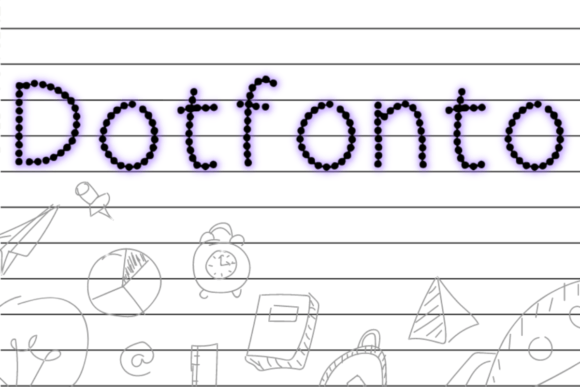
Dotfonto: The Dotted Font That Makes Teaching Handwriting Effortless
Teaching a child to write is one of the most rewarding yet time-consuming tasks a parent or educator can take on. Every letter, every number, every curve needs to be practiced again and again. Before you know it, you are spending hours drawing dotted lines by hand, printing traceable worksheets from random websites, or trying to find just the right resource. What if there was a better way? Dotfonto is exactly that solution—a specialized dotted font designed to help children learn the basics of writing upper and lower case letters, as well as numbers, without the endless prep work. You will no longer get tired of preparing letters and numbers for children. This font can also be used to create children's activity books for KDP or other platforms, opening up a world of creative and commercial possibilities.
What Is Dotfonto and Why Does It Matter?
Dotfonto is a dotted font created specifically for handwriting practice. Unlike standard fonts that produce solid, finished letters, Dotfonto renders each character as a series of dots. This dotted outline gives children a clear path to follow as they trace, helping them understand the shape, direction, and proportions of each letter or numeral. It is a simple concept, but the impact on learning is profound. Instead of guessing where to start or how to form a curve, the child simply connects the dots.
The value of a tool like Dotfonto goes beyond convenience. It directly addresses the most common challenge in early childhood education: repetition. Children need to trace letters dozens, even hundreds, of times before the motor patterns become automatic. With Dotfonto, you can generate unlimited practice sheets in seconds. Whether you are a parent helping a preschooler at home, a teacher managing a classroom, or a content creator building activity books, this dotted font turns a tedious chore into an efficient, scalable process.
How Dotfonto Simplifies Letter and Number Practice
Let's break down exactly how Dotfonto works in practice. Imagine you want to create a worksheet for the letter A in both uppercase and lowercase. With a typical font, you would need to manually add dotted lines or buy pre-made tracing sheets. With Dotfonto, you simply type the letter, and it appears as a clear, traceable dotted outline. The same applies to numbers from 0 to 9. This means you can build custom lessons in minutes, targeting exactly the letters or numbers a child needs to work on.
For example, a common activity might be a page with A a A a A a in dotted form, followed by blank lines for independent practice. Dotfonto makes this seamless. You can mix uppercase and lowercase, group similar shapes, or focus on problem letters like b and d or p and q. The font handles the visual work so you can focus on teaching.
Upper and Lower Case Letters: A Balanced Approach
Children often learn uppercase letters first because they are simpler and more visually distinct. However, lowercase letters make up the majority of written text. Dotfonto supports both cases equally, allowing you to create practice sheets that progress naturally from capital letters to lowercase, or that mix them together for advanced practice. This flexibility is crucial because a child's writing journey is not linear. Some children master uppercase quickly and struggle with lowercase, while others need more time on both. With Dotfonto, you can adapt the material to the child, not the other way around.
The dotted dots themselves are spaced at intervals that encourage proper stroke formation. The child learns to follow the path from top to bottom, left to right, which builds the foundational habits needed for fluent handwriting. Over time, the dots become less necessary, and the child transitions to writing on blank lines with confidence.
Numbers: Building Numeracy Through Writing
Handwriting practice is not just for letters. Writing numbers by hand reinforces numeral recognition, which is a key early math skill. Dotfonto includes all ten digits, each presented in the same clear dotted style. You can create worksheets for counting, number sequences, or simple arithmetic where the child traces the numerals before solving the problem. This dual focus on writing and numeracy makes Dotfonto a more complete educational tool.
For instance, a worksheet might have the numbers 1 through 10 in dotted form, with spaces for the child to write each number independently. Or you could create a page that says Trace the number 5: · · · · · and then provides a line for freehand practice. The possibilities are endless, and all of it is achievable with just a few clicks.
Real-World Applications of Dotfonto
Dotfonto is not just a font—it is a productivity tool for anyone involved in children's education or content creation. Let's explore some real-world scenarios.
For Parents: Supporting Learning at Home
Parents often struggle to find high-quality handwriting materials that match their child's specific needs. You might have a child who is ready to learn uppercase letters but still needs help with fine motor control. With Dotfonto, you can generate a custom worksheet in under a minute. Print it out, and your child has a focused practice session. No more scouring the internet for the perfect worksheet or spending hours drawing dots by hand. You will no longer get tired of preparing letters and numbers for children because the font does the heavy lifting.
For Teachers: Saving Time in the Classroom
Teachers manage multiple students at different skill levels. Creating individualized worksheets for each child is impractical with traditional methods. Dotfonto changes that. You can quickly produce a variety of sheets—some focusing on uppercase, some on lowercase, some on numbers—and distribute them based on each student's needs. The font integrates with standard word processors and design software, so there is no steep learning curve. Just type, print, and teach.
For Creators and Business Owners: Building Activity Books for KDP and Beyond
One of the most exciting applications of Dotfonto is in content creation. The market for children's activity books on platforms like Amazon KDP is enormous. Parents and educators are always looking for fresh, well-designed tracing books. With Dotfonto, you can create professional-quality handwriting practice books without hiring a designer or spending weeks on layout. You control the content, the progression, and the design. This font is a legitimate asset for anyone building a publishing business around educational materials.
Imagine launching a series of workbooks: Trace & Write: Uppercase Letters, Trace & Write: Lowercase Letters, Trace & Write: Numbers 0–20, and Trace & Write: Mixed Practice. Each book can be generated using Dotfonto, saving you hours of manual work. The font ensures consistency across all your titles, which builds brand recognition and customer trust.
Strengths and Considerations of Dotfonto
No tool is perfect, but Dotfonto comes close for its intended purpose. Let's examine its strengths and a few considerations to keep in mind.
Strengths
- Ease of use: Dotfonto works like any standard font. Install it, select it, and type. No special software or skills are required.
- Time efficiency: What used to take hours now takes minutes. This is the core value proposition, and it delivers.
- Scalability: Whether you need one worksheet or a hundred-page book, Dotfonto scales without extra effort.
- Educational effectiveness: The dotted format is proven to help children develop proper letter formation and fine motor skills.
- Versatility: Works for letters (upper and lower case), numbers, and even simple words or short sentences for advanced practice.
Considerations
- Font size and spacing: Depending on the age of the child, you may need to adjust font size and line spacing. Dotfonto works best when paired with guidelines or lined paper templates.
- Stroke direction: While the dots show the shape, they do not inherently indicate the order or direction of strokes. Teachers and parents should still demonstrate proper technique.
- Compatibility: Dotfonto is a standard font file, but some older software may render it differently. Always test a print sample before committing to a large project.
How to Choose If Dotfonto Is Right for Your Project
Dotfonto is an excellent choice if you are creating handwriting practice materials for young children, whether for personal use or commercial publication. However, it is worth asking yourself a few questions to ensure it fits your needs.
- What is your primary goal? If you want to save time while providing effective practice, Dotfonto is a strong match. If you need decorative or artistic fonts, look elsewhere.
- Who is your audience? Dotfonto is designed for children aged 3 to 7, roughly preschool to first grade. Older children may need advanced handwriting styles, such as cursive or continuous stroke fonts.
- How will you distribute the materials? For print (home, classroom, or KDP books), Dotfonto works perfectly. For digital use on screens, test legibility first, as dotted fonts can sometimes appear faint on low-resolution displays.
- Do you need additional elements? Dotfonto handles the letters and numbers, but effective worksheets often include starting dots, arrows, or line guides. You may want to combine Dotfonto with simple shapes or templates for a complete learning experience.
By answering these questions, you can confidently decide whether Dotfonto deserves a place in your toolkit.
Practical Tips for Getting the Most Out of Dotfonto
Once you have Dotfonto installed, a few best practices will help you create effective materials every time. First, always pair the dotted font with a solid line for guidance. A common approach is to have a row of dotted letters followed by a blank line where the child writes independently. This gradual release of responsibility builds confidence. Second, vary your activities. Some pages can focus on single letters, while others mix letters and numbers or include simple words like cat, dog, or the child's name. Third, consider the paper size and margins. For young children, larger font sizes (48pt to 72pt) are easier to trace. Adjust as needed for your specific age group.
For KDP creators, think about your book's structure. A typical handwriting workbook might include a cover page, an instruction page for parents, and then 26 pages for uppercase letters, 26 pages for lowercase, and 10 or more pages for numbers. Dotfonto makes it possible to produce this content in a single afternoon. You can also add review pages that mix all the characters together, giving children cumulative practice. The font is consistent, clean, and professional—exactly what buyers expect from a quality educational product.
Final Thoughts: Why Dotfonto Deserves a Place in Your Workflow
Handwriting is a fundamental skill that opens the door to all other learning. Yet the process of teaching it can be frustratingly repetitive for adults. Dotfonto bridges that gap by turning a dotted font into a practical, time-saving solution. Whether you are a parent trying to give your child a head start, a teacher managing a busy classroom, or a creator building a line of activity books for KDP, this font reduces the friction between intention and action. You will no longer get tired of preparing letters and numbers for children because Dotfonto does the work for you.
In a world where every minute counts, having a tool that simplifies a core educational task is invaluable. Dotfonto is not just a font—it is a shortcut to better teaching, better learning, and better content. Give it a try, and experience the difference that a well-designed dotted font can make.